That Menu Code Might Not Belong to the Restaurant
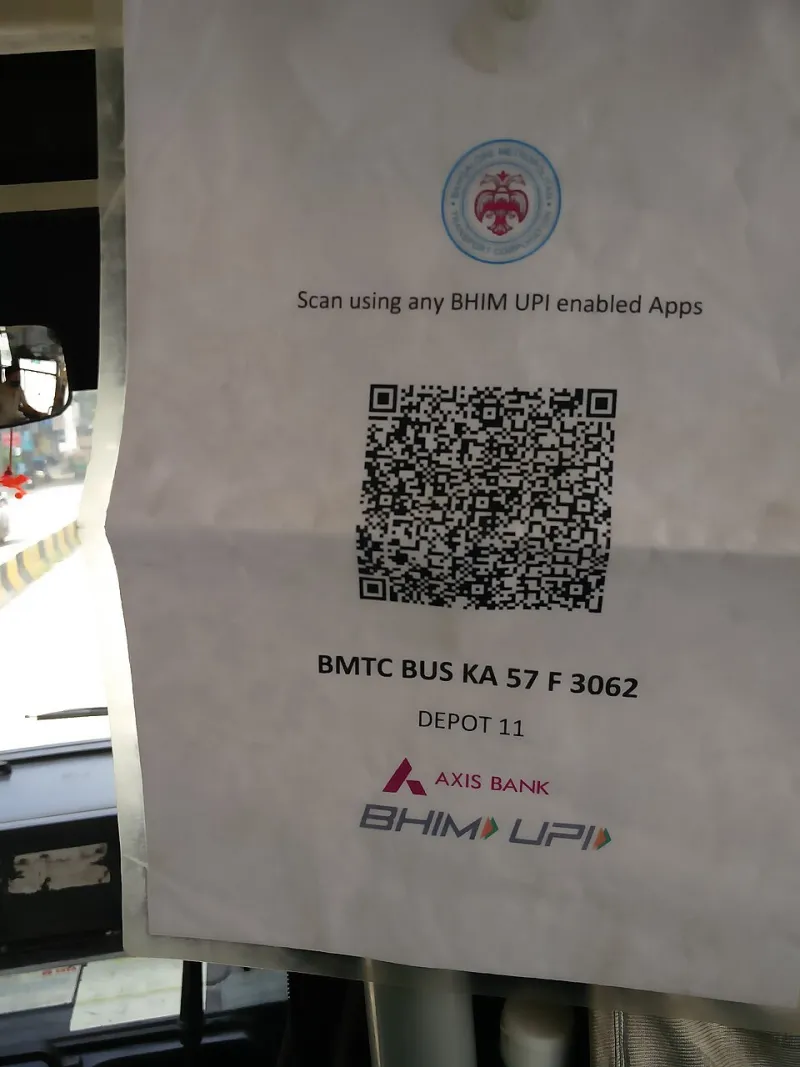
Photo: Mallikarjunasj, CC0, via Wikimedia Commons
The code taped to the parking meter looks official. It is the right size, the right color, the right place. You scan it, a payment page loads in your browser, and you enter a card number that will never reach the city. By the time you notice the charge, the sticker is gone and so is the money.
This is quishing — QR-assisted phishing — and it has quietly become one of the more effective consumer fraud patterns in the United States, because it exploits two things at once: the trust we place in physical objects, and the fact that a phone screen is a terrible place to evaluate a web address.
Why the phone makes the scam easier
On a desktop, a link arrives with a visible address and a hover preview. On a phone, a QR code produces none of that. The camera app launches a browser, and the browser hides most or all of the URL behind a compact address bar that truncates long strings after a few characters.
Three other factors compound the problem. QR codes are unreadable by design, so no one can eyeball a malicious one. Mobile pages are optimized to be short — a login box, a card form, a countdown timer — which means there is no page furniture to scrutinize. And crucially, the code is often physically anchored to a legitimate place: a table, a bulletin board, a delivery notice, a utility shutoff warning taped to a door.
Where the codes are showing up
- Parking meters and pay stations, especially in dense downtowns where third-party payment apps compete for the same curb.
- Tolling and transit notices, which frequently impersonate state toll authorities.
- Package and delivery slips that promise a redelivery for a small fee.
- Restaurant tables, hotel lobbies, and event flyers.
- Utility disconnection warnings with a call-back number and a payment code.
- Rebate offers, sweepstakes, and cryptocurrency or gift-card requests.
- Peer-to-peer payment requests from strangers and marketplace buyers.
The common thread is urgency. A scam code almost always wants you to act within minutes, and almost always wants a card number, a login, or a payment.
Preview the destination before you open it
The good news is that both major mobile platforms now make it possible to see where a code points before the page loads.
On iPhone, point the camera at the code until the yellow link button appears. Instead of tapping it, press and hold the button. A preview sheet shows the full destination, with options to copy or open. Read the address before you commit. In iOS 17 and later the camera also surfaces an action button rather than auto-opening, which buys you a moment.
On Android, open the camera or Google Lens, scan the code, and look for the preview option in the Lens settings — enable it if it is off. Lens can display the destination link before navigating, and it will also warn on some known-malicious domains. Some manufacturer camera apps open links automatically; if yours does, consider using Lens directly.
The rule is simple: never tap a code you have not read.
Read the address like a skeptic
When the preview appears, examine the part immediately before the first single slash. That is the actual domain, and everything to its left is a subdomain that a criminal can set to anything, including the name of your bank. A string like secure-bankname.account-verify.top is not your bank; it is a subdomain of account-verify.top.
Watch for lookalikes: a capital I in place of a lowercase l, a zero for an O, an extra hyphen, a hyphen swapped for a dot, or a familiar brand plus a word like support, portal, or billing. Watch for country-code endings that have nothing to do with the organization, and for the newer cheap top-level domains where fraud clusters. Be skeptical of shortened links, which are frequently used to disguise the real destination in printed codes.
And remember that the padlock means the connection is encrypted, not that the site is honest. The overwhelming majority of phishing pages now use HTTPS.
The cases where you should type instead of scan
Any code that leads to a login, a card entry, or a payment deserves more than a scan. If you need to reach your bank, your utility, your toll authority, or a government agency, type the address you already know, or open the app you already installed. Legitimate organizations do not require you to reach them through a printed square.
For parking specifically, city meters in most large US metros publish an official app or a short numeric location code. Use the app you have used before, and if you must pay by web, confirm the meter's own printed instructions rather than a sticker applied over them. A code that sits on a sticker, with edges, on top of metal, deserves a second look — that is the tell in a large share of reported cases.
For peer-to-peer payments, treat a QR code presented by a stranger as a request, not a receipt. If someone sends a code and says you need to scan it to receive money, that is not how these systems work; scanning usually sends money.
If you already scanned and entered something
Act quickly and in this order. Close the page. If you entered a password, change it from a different device, starting with your email account. If you entered card details, call the number on the back of the card and ask for the card to be frozen and replaced. If you installed a profile or an app the page pushed at you, remove it. If you granted a permissions request, revoke it in settings.
Then watch your accounts for small test charges, review your credit card statements for a few weeks, and consider a fraud alert with the major credit bureaus. If a payment app was involved, report the transaction inside the app immediately; recovery windows are short.
Reporting a malicious code
Report fraud to the Federal Trade Commission at reportfraud.ftc.gov, and report internet crime to the FBI's Internet Crime Complaint Center at ic3.gov. Tell the business whose code was covered — a restaurant manager or a city parking office can have the sticker removed, which protects the next person. You can also forward suspicious delivery texts to 7726, the spam reporting number used by US carriers. If a code leads to a page impersonating a bank, the bank's own fraud line wants to know.
A short rule set
- Preview the destination, always.
- Read the registrable domain, not the subdomain.
- Type known addresses for money, health, and government.
- Distrust stickers, especially ones applied over printed instructions.
- Treat urgency as evidence of fraud, not evidence of importance.
- Never let a page talk you into installing a profile or an app.
- When in doubt, walk away and look the organization up yourself.
A QR code is just a link in costume. Read it the way you would read any other link — or do not read it at all, and go straight to the source.